Recurso del reel de @alexsepu_ · 1 nov 2026
De un video grabado en tu sala a un keynote de seis cámaras
Me grabé 17 segundos con el celular en mi sala. Con 8 fotos y un prompt, Seedance 2.5 me subió a un escenario de lanzamiento, con seis ángulos de cámara, público y mi propia voz. Aquí está el prompt completo para llenarlo con lo tuyo, las 8 fotos y todo lo que me falló en el camino.
El video lo generé el 30 de octubre de 2026, en una sola tirada. Los precios y los límites de Seedance 2.5 los leí en kie.ai el 1 de noviembre de 2026.
Lo que prometí en el video
El prompt completo, listo para llenar
Es el mismo que usé, convertido en plantilla. Lo que está entre [corchetes] es tuyo: qué presentas, tus frases y en qué segundo las dices. Va en inglés porque así lo sigue mejor el modelo; tus frases van en tu idioma, entre comillas.
1 · Sube en orden
Primero las 8 fotos y luego tu video. El orden de subida pone los números: la primera foto es @Image1.
2 · Llena los corchetes
Tus frases y sus segundos salen de tu video. Velo con el cronómetro antes de escribir.
3 · Prueba barato
La primera tirada, a 720p: unos US$6.50. La final, a 1080p.
Generate a [17]-second vertical 9:16 video in a single generation: a live technology keynote, filmed like a real broadcast of a product launch, with six camera angles joined by hard cuts. One presenter on stage introduces [WHAT YOU PRESENT: a fitness app], speaking [YOUR LANGUAGE: Spanish (Mexico)] to a full theater. Real-time speed throughout.

REFERENCES — each one has a single job:
- @Image1 and @Image2: the presenter's real face (front and three-quarter). Match it exactly in every shot and from every angle: same features, same [YOUR HAIR: full head of dark curly hair], same [YOUR FACIAL HAIR: light stubble], same age, same healthy skin. Never bald, never a full beard, never grey hair, never older, never a different person. Do not beautify, slim or smooth the face.
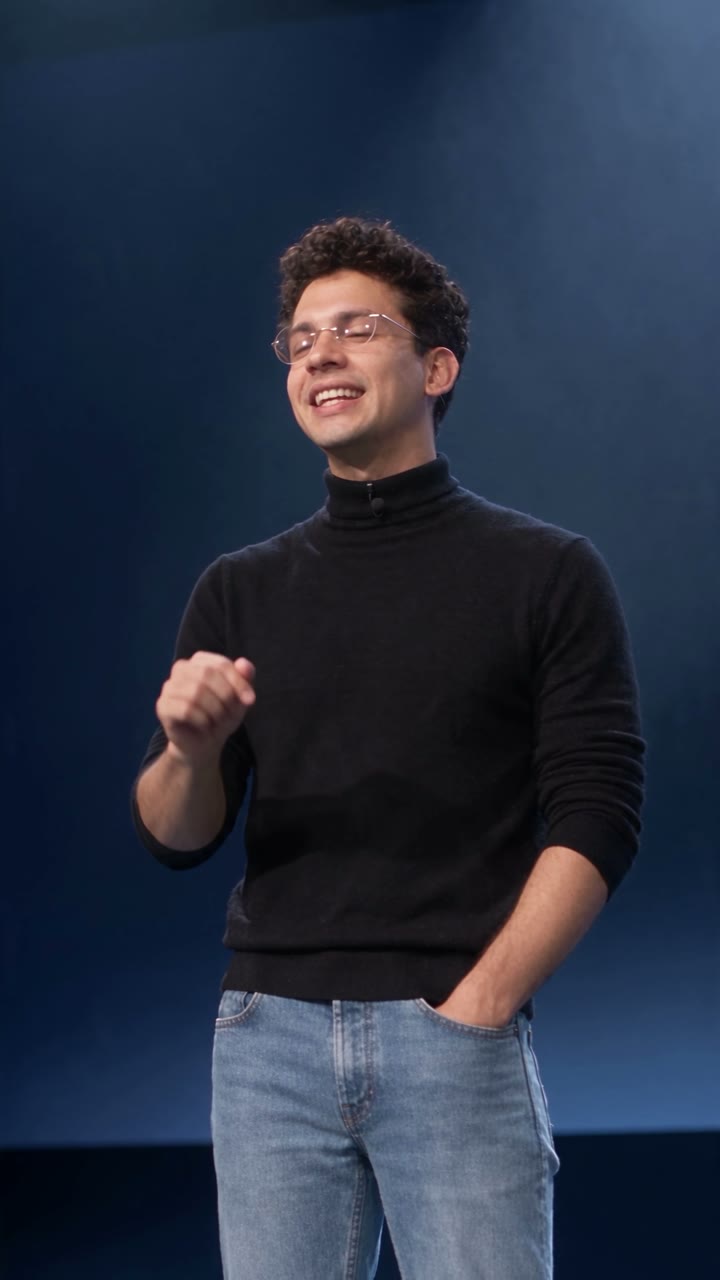
- @Image3: the presenter in costume, close: the face wearing the glasses, the black mock-neck sweater, the tiny black lavalier mic clipped at the collar, the stage light.
- @Image4: the complete costume, head to toe, on this stage: black fine-knit mock-neck sweater, light-wash straight blue jeans, plain grey sneakers, the round rimless glasses. Identical in every shot.
- @Image5: the theater seen from the audience: matte black stage, the giant screen behind as a deep navy field with soft beams of light, the cool-white follow-spot pool at center stage, two low black floor monitors at the stage edge, thin haze, silhouetted audience heads in the foreground.
- @Image6: the reverse angle, from upstage behind the presenter, looking out at the seated audience.
- @Image7: the phone and how it is held: a plain black smartphone whose screen is flat, evenly lit chroma-key green, with the black bezel and all four corners visible.
- @Image8: the exact eyeglasses: small, perfectly round, rimless, thin silver bridge and temples. Always on the face, never changing shape, never tinted.
- @Video1: the presenter's performance, voice and timing. Follow it beat by beat: [YOUR ACTIONS IN ORDER: walking on stage, the left hand resting in the left front pocket of the jeans, the right hand taking the phone out of the right front pocket, raising it beside the face, lowering it and sweeping the arm out to present the giant screen]. Lip-sync exactly to the [YOUR LANGUAGE: Spanish] speech in the audio of @Video1. Take only body language, voice and timing from it; ignore its clothing, [YOUR ROOM: white room, framed picture, tiled floor], daylight and static camera. None of these ever appear.

LOOK: an unedited live broadcast of a tech keynote, shot on broadcast cameras with long zoom lenses. Real theatrical lighting: one soft-edged cool-white follow spot from the balcony, a dim blue wash, the navy giant screen rim-lighting the presenter, thin haze. Deep blacks, natural warm skin tones, natural motion blur, mild sensor noise. No cinematic color grade, no lens flares. The presenter speaks to the audience with the eyeline just past the lens, never into it, eyes open with natural blinks.

TIMELINE — hard cuts exactly at [2.3, 5.8, 8.6, 10.6 and 13.8] s; no other cuts, no dissolves:

0–[2.3] s · SHOT 1 · WIDE FROM THE AUDIENCE, framed like @Image5. Slow push-in from the center aisle past the silhouetted heads. The presenter walks in from frame right into the follow-spot pool at center stage, left hand in the jeans pocket, and says, warm and confident: "[YOUR LINE 1]" ([0.4–1.7] s). Low audience murmur.

[2.3–5.8] s · SHOT 2 · MEDIUM SHOT, LOW ANGLE from the front edge of the stage, slightly left, the navy giant screen behind the head; gentle drift to the right. With a knowing half-smile, the right hand gesturing: "[YOUR LINE 2]" ([2.6–5.0] s, playful). [AUDIENCE REACTION: On the last word the audience laughs off-screen; the presenter holds a straight face for a beat.]

[5.8–8.6] s · SHOT 3 · MEDIUM CLOSE-UP, FRONTAL, eye level, framed like @Image3: long lens, shallow depth of field, very slow push-in. "[YOUR LINE 3]" ([5.9–8.1] s), [YOUR GESTURE: the right palm opening upward at chest height].

[8.6–10.6] s · SHOT 4 · REVERSE ANGLE from upstage behind the presenter, framed like @Image6: back of the head and shoulder in the foreground, the silver temple of the glasses catching the light, the seated audience beyond, smiling. Slow lateral move. "[YOUR LINE 4]" ([9.2–9.7] s), [YOUR GESTURE: one finger raised].

[10.6–13.8] s · SHOT 5 · ONE CONTINUOUS MOVE, no cut. It starts as a close-up at hip height: on "[YOUR LINE 5]" ([10.8–11.4] s) the right hand slides into the right front pocket of the jeans and pulls out the phone from @Image7. The camera tilts up and rises with the phone to a medium close-up as the phone is held up beside the face at shoulder height, screen toward the camera. From [11.6] to [13.4] s the screen is fully visible: flat, evenly lit chroma-key green with nothing on it, no reflections, the black bezel and all four rounded corners visible and sharp, fingers only on the edges. A quick glance at the phone, back to the audience with a confident smile, the phone lowers, and softly: "[YOUR LINE 6]" ([12.9–13.4] s).

[13.8–17.0] s · SHOT 6 · THE REVEAL. Wide shot from the audience side, high on a crane, looking toward the stage and the giant screen. On "[YOUR LAST LINE]" ([14.4–14.9] s) the presenter turns to face the giant screen, back to the camera, sweeps the right arm up to present it, then walks out of frame to the right. The camera keeps pushing forward and up, straight into the giant screen, while its navy glow fades to pure black. From [16.2] s the frame is completely black until [17.0] s.

SOUND: only the presenter's own voice from @Video1, the same words with the same timing, no other words and no narrator, with the natural reverb of a large theater; a low audience murmur at the start, [a burst of laughter at 5.0 s], an expectant hush from [11] s, warm applause rising at [14.9] s and fading under the black. No music.

CONTINUITY IN EVERY SHOT: exactly one presenter on stage; the same face, hair, glasses, sweater, lavalier mic, jeans and sneakers; the phone only in the right hand and only from [10.8] s on; five fingers on each hand; the giant screen is navy (black at the end), never green, never with text or images; the audience stays seated.

PROHIBITED: subtitles, captions or any on-screen text; broadcast graphics such as lower thirds, name titles, channel logos, tickers or timecode; logos, brand marks or watermarks on anything, including the phone; anything readable on any screen; text, logos or product images on the giant screen; a headset microphone; a second phone; green light on the face; extra people on stage; morphing faces or hands; slow motion or speed ramps; lens flares, neon or light leaks; the [YOUR ROOM: white room, framed picture or tiled floor] from @Video1.
Así lo llené yo
Mis frases y sus segundos, tal cual van en la TIMELINE. Si tu guion tiene otro ritmo, cambias los segundos y los cortes, no la estructura.
| Toma | Segundos y lo que digo |
|---|---|
| 1 · Abierta desde el público | 0–2.3 s · «Todos conocemos a ese coach…» |
| 2 · Media en contrapicado | 2.3–5.8 s · «…ese que no te hará caso, a menos que seas la linda del gimnasio.» |
| 3 · Cerrada de frente | 5.8–8.6 s · «Imagínate tenerlo… en la palma de tu mano,» |
| 4 · Contraplano | 8.6–10.6 s · «o mejor aún,» |
| 5 · Del bolsillo a la cara | 10.6–13.8 s · «en tu bolsillo.» … «Les presento…» |
| 6 · La revelación | 13.8–17.0 s · «…a Entrena.» y la cámara entra a la pantalla hasta quedar en negro |
Qué hace cada bloque
| Bloque | Para qué está |
|---|---|
| REFERENCES | Le da un solo trabajo a cada foto. Si una foto hace dos cosas, el modelo las mezcla. |
| LOOK | Que parezca transmisión en vivo y no película: cámaras de transmisión, un solo foco, nada de gradación de cine. |
| TIMELINE | Dónde corta cada cámara y qué pasa en cada toma, con tus frases y sus segundos. |
| SOUND | Tu voz con eco de teatro, el murmullo, la risa en el chiste y el aplauso al final. Sin música. |
| CONTINUITY | Lo que no puede cambiar entre tomas: una sola persona, la misma ropa, cinco dedos en cada mano. |
| PROHIBITED | Lo que el modelo mete solo si no se lo prohíbes: letreros, cintillos de televisión, logos, un micrófono de diadema. |
El prompt no nombra a nadie famoso, y es a propósito. Si escribes el nombre de una persona real, el modelo te bloquea o te cambia la cara por la suya. El look de keynote clásico de lanzamiento sale del suéter de cuello alto, los lentes redondos, los jeans, los tenis y el escenario. Por lo mismo el bloque de tu cara dice «never bald, never a full beard, never grey hair»: ese vestuario jala hacia la cara que todos tenemos en la cabeza.
Ver el prompt real, tal cual lo lancé el 30 de octubre
Generate a 17-second vertical 9:16 video in a single generation: a live technology keynote, filmed like a real broadcast of a product launch, with six camera angles joined by hard cuts. One presenter on stage introduces a fitness app, speaking Spanish (Mexico) to a full theater. Real-time speed throughout.

REFERENCES — each one has a single job:
- @Image1 and @Image2: the presenter's real face (front and three-quarter). Match it exactly in every shot and from every angle: same features, same full head of dark curly hair, same light stubble, same age, same healthy skin. Never bald, never a full beard, never grey hair, never older, never a different person. Do not beautify, slim or smooth the face.
- @Image3: the presenter in costume, close: the face wearing the glasses, the black mock-neck sweater, the tiny black lavalier mic clipped at the collar, the stage light.
- @Image4: the complete costume, head to toe, on this stage: black fine-knit mock-neck sweater, light-wash straight blue jeans, plain grey sneakers, the round rimless glasses. Identical in every shot.
- @Image5: the theater seen from the audience: matte black stage, the giant screen behind as a deep navy field with soft beams of light, the cool-white follow-spot pool at center stage, two low black floor monitors at the stage edge, thin haze, silhouetted audience heads in the foreground.
- @Image6: the reverse angle, from upstage behind the presenter, looking out at the seated audience.
- @Image7: the phone and how it is held: a plain black smartphone whose screen is flat, evenly lit chroma-key green, with the black bezel and all four corners visible.
- @Image8: the exact eyeglasses: small, perfectly round, rimless, thin silver bridge and temples. Always on the face, never changing shape, never tinted.
- @Video1: the presenter's performance, voice and timing. Follow it beat by beat: walking on stage, every gesture, the left hand resting in the left front pocket of the jeans, the right hand taking the phone out of the right front pocket, raising it beside the face, lowering it and sweeping the arm out to present the giant screen. Lip-sync exactly to the Spanish speech in the audio of @Video1. Take only body language, voice and timing from it; ignore its clothing, white room, framed picture, tiled floor, daylight and static camera. None of these ever appear.

LOOK: an unedited live broadcast of a tech keynote, shot on broadcast cameras with long zoom lenses. Real theatrical lighting: one soft-edged cool-white follow spot from the balcony, a dim blue wash, the navy giant screen rim-lighting the presenter, thin haze. Deep blacks, natural warm skin tones, natural motion blur, mild sensor noise. No cinematic color grade, no lens flares. The presenter speaks to the audience with the eyeline just past the lens, never into it, eyes open with natural blinks.

TIMELINE — hard cuts exactly at 2.3, 5.8, 8.6, 10.6 and 13.8 s; no other cuts, no dissolves:

0–2.3 s · SHOT 1 · WIDE FROM THE AUDIENCE, framed like @Image5. Slow push-in from the center aisle past the silhouetted heads. The presenter walks in from frame right into the follow-spot pool at center stage, left hand in the jeans pocket, and says, warm and confident: "Todos conocemos a ese coach…" (0.4–1.7 s). Low audience murmur.

2.3–5.8 s · SHOT 2 · MEDIUM SHOT, LOW ANGLE from the front edge of the stage, slightly left, the navy giant screen behind the head; gentle drift to the right. With a knowing half-smile, the right hand gesturing: "…ese que no te hará caso, a menos que seas la linda del gimnasio." (2.6–5.0 s, playful). On the last word the audience laughs off-screen; the presenter holds a straight face for a beat.

5.8–8.6 s · SHOT 3 · MEDIUM CLOSE-UP, FRONTAL, eye level, framed like @Image3: long lens, shallow depth of field, very slow push-in. "Imagínate tenerlo…" (5.9–6.7 s), a beat, then "…en la palma de tu mano," (7.3–8.1 s), the right palm opening upward at chest height on "palma".

8.6–10.6 s · SHOT 4 · REVERSE ANGLE from upstage behind the presenter, framed like @Image6: back of the head and shoulder in the foreground, the silver temple of the glasses catching the light, the seated audience beyond, smiling. Slow lateral move. "o mejor aún," (9.2–9.7 s), one finger raised.

10.6–13.8 s · SHOT 5 · ONE CONTINUOUS MOVE, no cut. It starts as a close-up at hip height: on "en tu bolsillo." (10.8–11.4 s) the right hand slides into the right front pocket of the jeans and pulls out the phone from @Image7. The camera tilts up and rises with the phone to a medium close-up as the phone is held up beside the face at shoulder height, screen toward the camera. From 11.6 to 13.4 s the screen is fully visible: flat, evenly lit chroma-key green with nothing on it, no reflections, the black bezel and all four rounded corners visible and sharp, fingers only on the edges. A quick glance at the phone, back to the audience with a confident smile, the phone lowers, and softly: "Les presento…" (12.9–13.4 s).

13.8–17.0 s · SHOT 6 · THE REVEAL. Wide shot from the audience side, high on a crane, looking toward the stage and the giant screen. On "…a Entrena." (14.4–14.9 s) the presenter turns to face the giant screen, back to the camera, sweeps the right arm up to present it, then walks out of frame to the right. The camera keeps pushing forward and up, straight into the giant screen, while its navy glow fades to pure black. From 16.2 s the frame is completely black until 17.0 s.

SOUND: only the presenter's own voice from @Video1, the same words with the same timing, no other words and no narrator, with the natural reverb of a large theater; a low audience murmur at the start, a burst of laughter at 5.0 s, an expectant hush from 11 s, warm applause rising at 14.9 s and fading under the black. No music.

CONTINUITY IN EVERY SHOT: exactly one presenter on stage; the same face, hair, glasses, sweater, lavalier mic, jeans and sneakers; the phone only in the right hand and only from 10.8 s on; five fingers on each hand; the giant screen is navy (black at the end), never green, never with text or images; the audience stays seated.

PROHIBITED: subtitles, captions or any on-screen text; broadcast graphics such as lower thirds, name titles, channel logos, tickers or timecode; logos, brand marks or watermarks on anything, including the phone; anything readable on any screen; text, logos or product images on the giant screen; a headset microphone; a second phone; green light on the face; extra people on stage; morphing faces or hands; slow motion or speed ramps; lens flares, neon or light leaks; the white room, framed picture or tiled floor from @Video1.
Las 8 fotos
Ocho fotos, cada una con un solo trabajo
El modelo no adivina: cada foto le resuelve una cosa y el prompt le dice cuál. Se suben en este orden, porque el orden de subida es lo que pone los números. La primera que subes es @Image1.
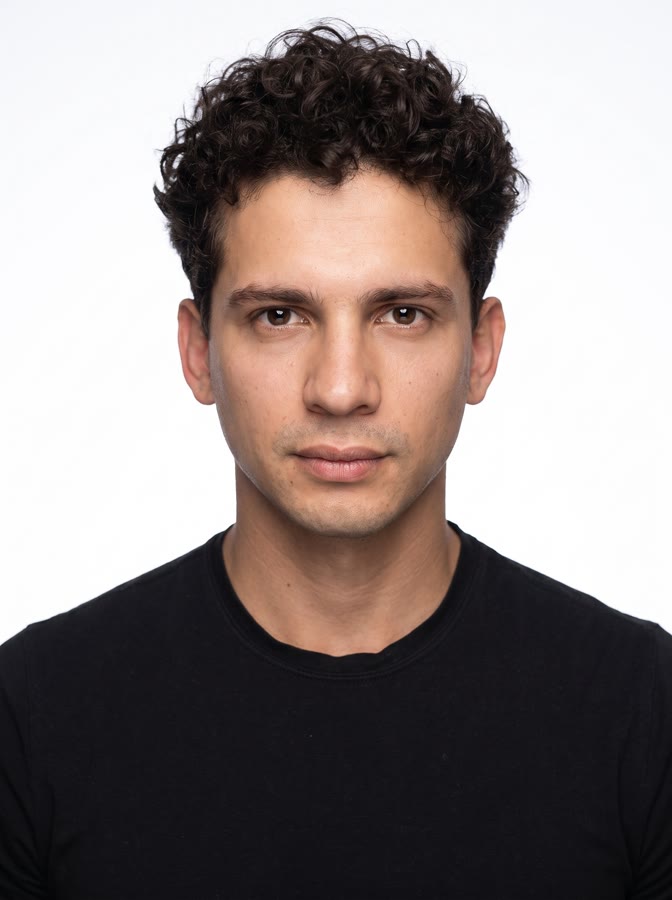 @Image1Tu cara de frenteFondo blanco, luz pareja, boca cerrada.
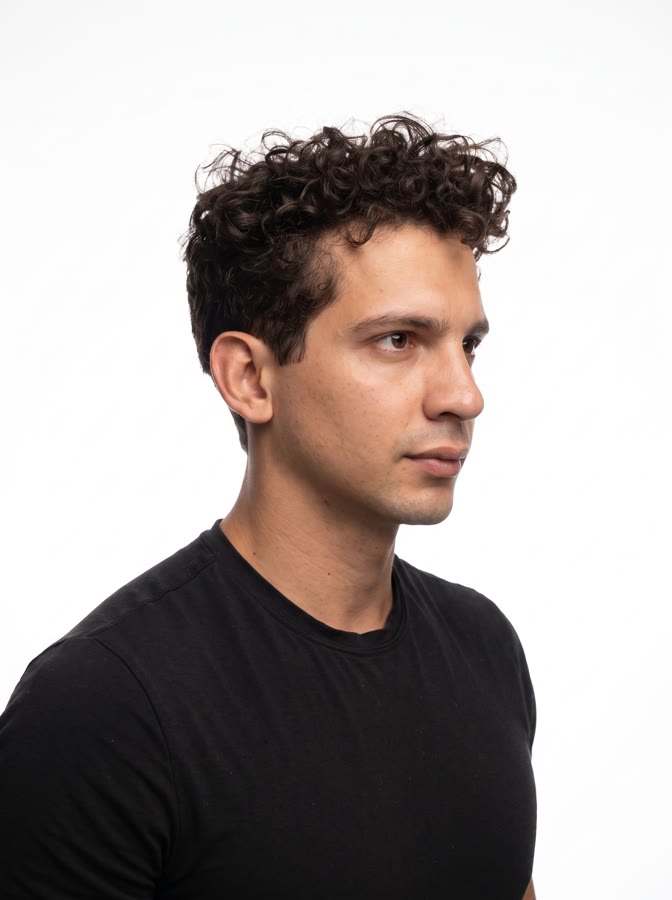 @Image2Tu cara en tres cuartosLa misma luz, girado.
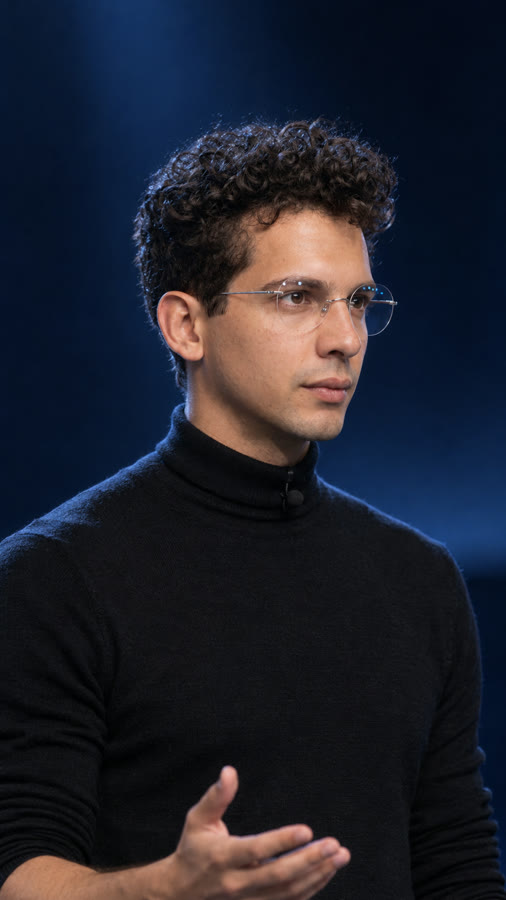 @Image3Tu personaje, de cercaLa cara con lentes, el suéter, el micrófono de solapa y la luz.
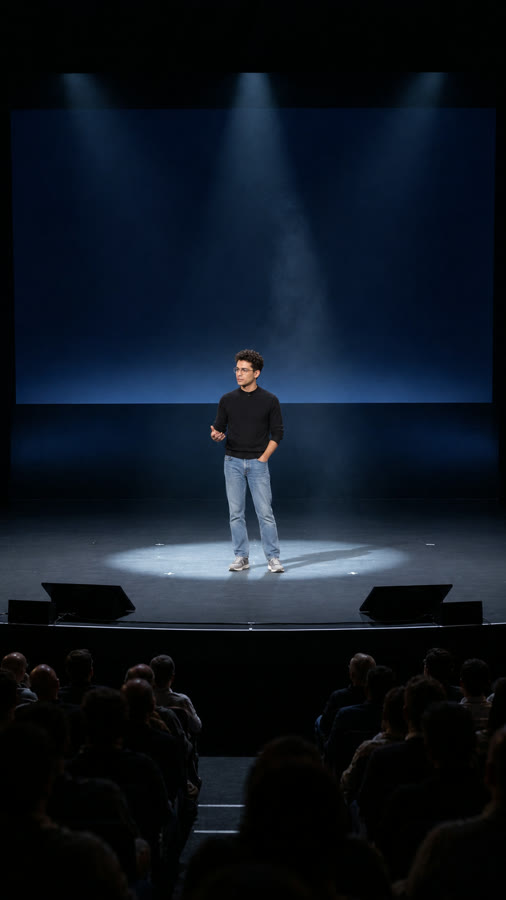 @Image4El vestuario completoDe pies a cabeza, y qué tan grande te ves en el escenario.
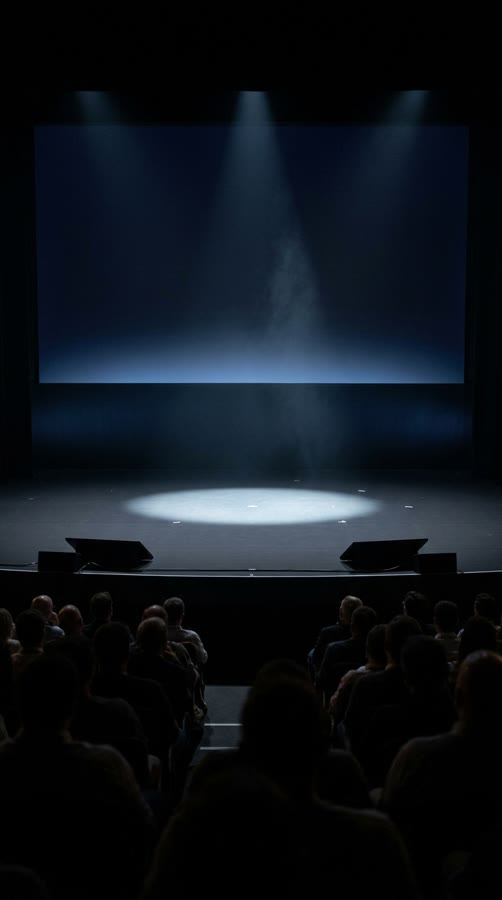 @Image5El teatro desde el públicoEscenario negro, pantalla azul marino y un solo foco.
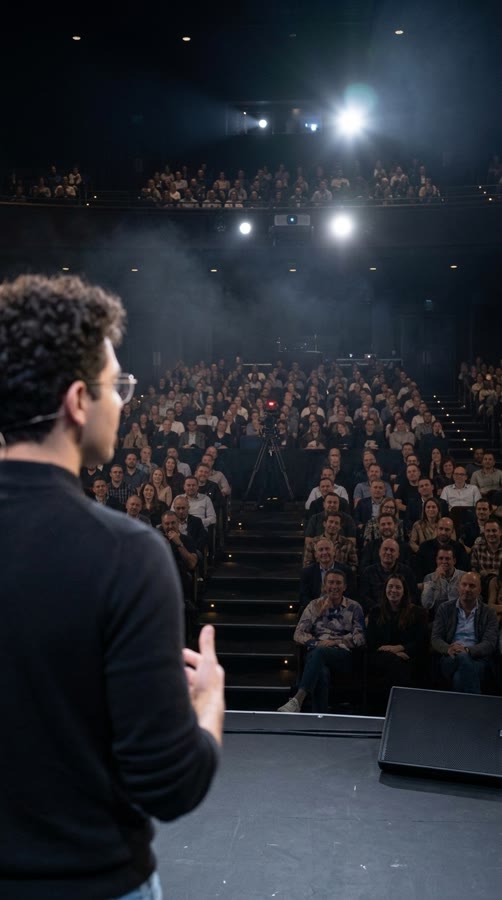 @Image6El teatro desde el escenarioEl contraplano: tu espalda y el público.
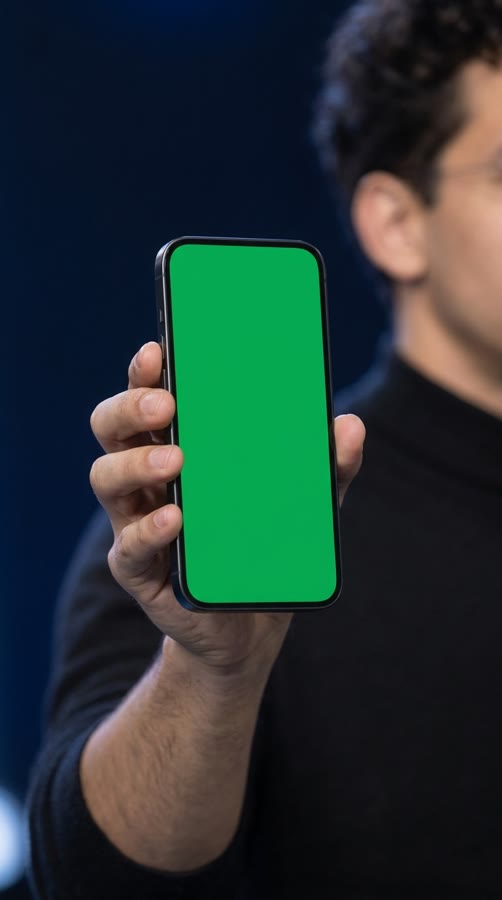 @Image7El teléfono en verdeVerde plano y las cuatro esquinas a la vista.
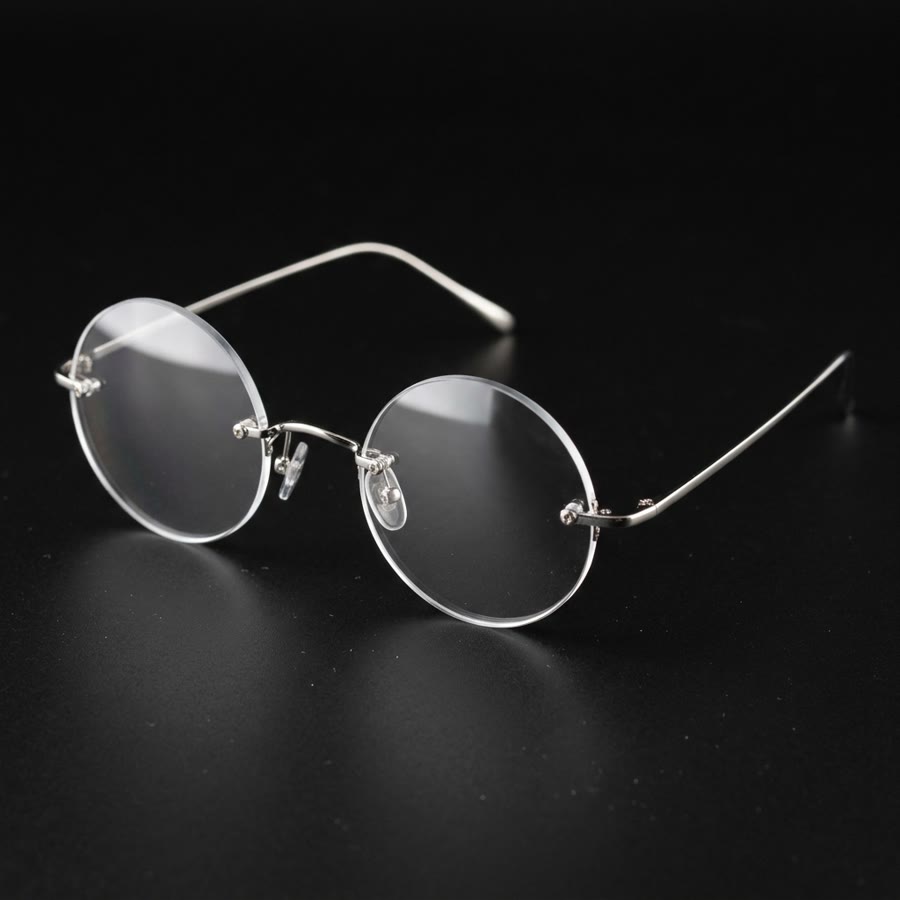 @Image8Los lentes exactosRedondos, sin aro, puente de plata.
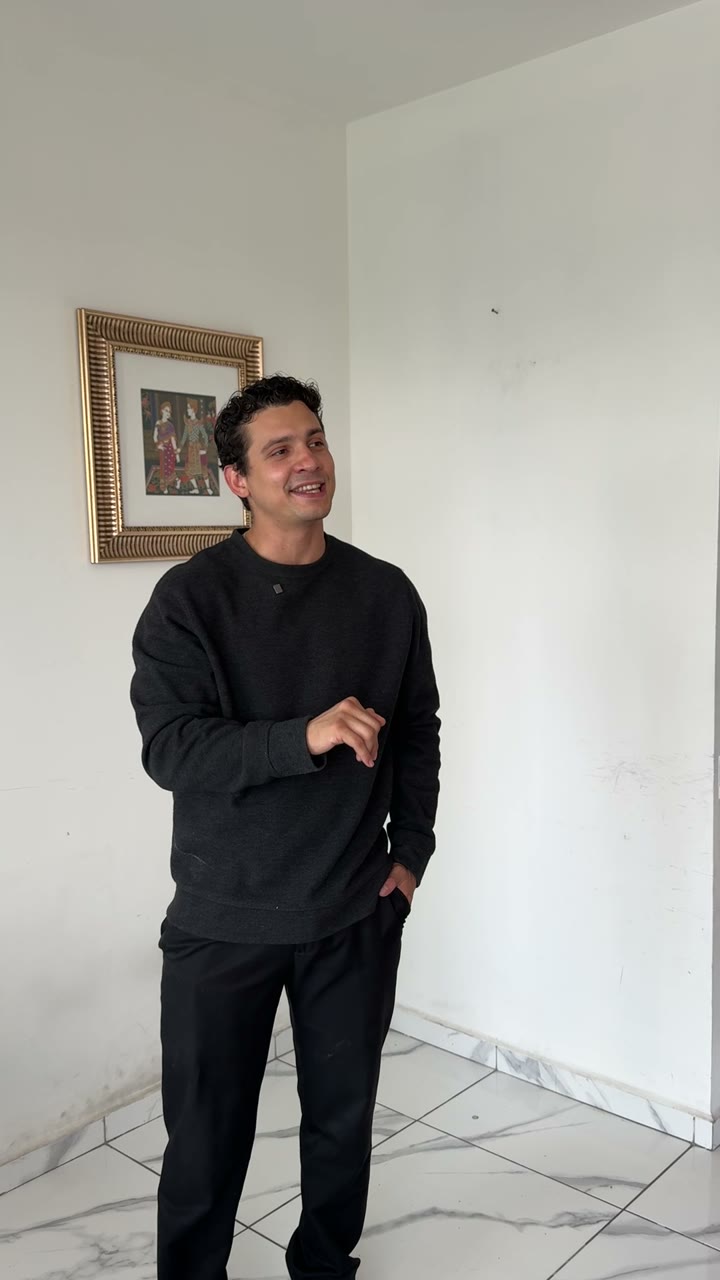
El video que grabaste, en 720×1280. De aquí sale todo lo que haces y dices; el cuarto, la ropa y la cámara fija el modelo los ignora porque el prompt se lo pide.
Un .zip de 0.8 MB con las 8 fotos numeradas en el orden de subida y un LEEME con qué hace cada una.
Las dos primeras son mi cara. Te las dejo para que veas cómo deben verse las tuyas. Si las usas tal cual, el video sale con mi cara: cámbialas por fotos tuyas y rehaz las que salen contigo, la 3, la 4, la 6 y la 7. El escenario (5) y los lentes (8) te sirven tal cual.
Haz las tuyas
Seis imágenes, en este orden
Cada una usa a las anteriores como referencia, así que el orden importa. Antes de pasar a la siguiente, revisa su lista: una imagen que falla contamina todas las que siguen.
Necesitas 3 fotos tuyas en fondo blanco: de frente y en tres cuartos hacia cada lado, boca cerrada, sin lentes. Si no las tienes, en la guía de Pro Photo te dejé cómo hacerlas con Nano Banana.
En estos prompts «Image 1, Image 2…» es el orden en que adjuntas las fotos en ese paso, no los números de Seedance. Pruébalos en Nano Banana 2.1, que es barato, y la final hazla en GPT Imágenes 2.5 con las mismas referencias en el mismo orden.
-
Los lentes. Van primero
Motor: Nano Banana 2.1 o GPT Imágenes 2.5 · 1K · 1:1
Adjunta: nadaVan primero porque las imágenes con tu cara copian estos lentes. Sale como @Image8.
Redondos perfectos, sin aro alrededor del cristalPuente y patillas de plata delgadaNingún logo ni grabadoVer el prompt de los lentes
Scene: Product photograph on a seamless matte black surface, a soft overhead softbox plus a thin white edge light from behind, shot on a Sony A7 IV with a 90mm macro lens at f/8, three-quarter front view at table height. Square 1:1.
Subject: A pair of small, perfectly round rimless eyeglasses with the temples open, resting on the surface. Clear lenses about 40 mm across, no tint and no rim around them, held only by a thin silver metal bridge and two thin silver temples fixed to each lens with tiny screws; small clear nose pads on thin silver arms; plain silver temple tips.
Important details: One long soft reflection runs across each lens; a faint reflection of the glasses on the black surface; a little dust on the surface in the foreground, out of focus.
Use case: Reference image so an AI video reproduces exactly this eyewear on a presenter in every shot.
Constraints: No logo, engraving, text or watermark anywhere. No tinted or colored lenses, no thick frames, no tortoiseshell, no gold. Square 1:1.
-
El escenario. Visto desde el público
Motor: GPT Imágenes 2.5 o Nano Banana 2.1 · 1K · 9:16 (si no lo acepta, 2:3)
Adjunta: nadaEs el lugar de todo el video. Sale como @Image5.
La pantalla gigante sin nada escrito ni dibujadoUn solo foco en el centro del escenarioPúblico de espaldas, gente normal; nada de láseres ni neónVer el prompt del escenario
Scene: An unedited frame grab from the live broadcast of a technology product keynote, taken from the center aisle about two-thirds of the way back in a darkened 600-seat theater, camera at seated eye level, Sony FX9 with a 24-70mm zoom at about 40mm. Natural broadcast exposure, no cinematic color grading. Vertical 9:16.
Subject: The stage just before the presenter walks on. A wide stage with a matte black floor. A giant 16:9 LED screen fills the upper back wall; it is on but shows only a deep navy-to-black gradient with a faint, soft cool-blue glow along its lower edge: no text, no logo, no image. A single soft-edged cool-white follow spot draws an oval pool of light on the floor at center stage.
Important details: The bottom quarter of the frame is the backs of audience heads and shoulders in silhouette, softly out of focus: ordinary people of different ages and haircuts, one head tilted, one person leaning over to whisper. A thin haze makes the follow-spot beam visible from the balcony above. Two low black confidence monitors sit at the front edge of the stage, angled toward the stage, their screens not visible. Small strips of white spike tape mark the floor near the light pool; a black cable runs along the stage lip. The sides of the auditorium fall into darkness. Deep but not crushed blacks, mild sensor noise in the shadows, no added sharpening.
Use case: Location reference for an AI video. It must read instantly as a tech keynote: stage, giant screen, light pool and audience, with nothing competing.
Constraints: No people on stage. No readable text, signs, logos or watermarks anywhere, screens included. No lens flares, no light rays other than the one haze beam, no neon, no LED strips, no lasers, no smoke clouds. Vertical 9:16.
-
Tu retrato de keynote. La pieza más importante
Motor: prueba en Nano Banana 2.1, la final en GPT Imágenes 2.5 · 1K · 9:16
Adjunta, en orden: tus 3 fotos de cara, los lentes (paso 1) y el escenario (paso 2)De aquí salen tu cara, los lentes y el suéter de todas las tomas. Sale como @Image3. Saqué dos versiones y en una los lentes salieron ovalados: me quedé con la de lentes redondos.
¿Eres tú? Si la cara no se parece, no sigas: repite este pasoLos lentes son los del paso 1Cuello alto doblado una vez y mangas subidasBoca cerrada, sin sonrisaVer el prompt del retrato
REFERENCES (attached in this order): Image 1 — IDENTITY (front). Image 2 — IDENTITY (three-quarter). Image 3 — IDENTITY (three-quarter, other side). Image 4 — GLASSES (reproduce exactly). Image 5 — LOCATION (this stage, its giant navy screen and its light).
Scene: An unedited frame grab from the live broadcast of the keynote in Image 5, shot from the front of the house on a Sony FX9 with a 70-200mm zoom at about 160mm, f/2.8, so the stage and the giant navy screen behind melt into soft dark-blue bokeh. Medium close-up from mid-chest up, the presenter slightly off-center to the right. Natural broadcast color, no cinematic color grading. Vertical 9:16.
Subject: The person in Images 1-3 — those reference images ARE their face: copy it exactly, feature for feature, hair and facial hair included, at exactly the age and with exactly the same fresh, healthy skin shown in those photos. Do not age them up, do not add wrinkles, pockmarks, pitted or rough skin, exaggerated pores, under-eye bags or blemishes, do not slim or lighten the face, and do not average it toward a generic model. No description of their features is given on purpose; if the face is not recognisably them, the frame is wrong. IGNORE the clothing and the background in Images 1-3; the wardrobe and setting are defined here. The presenter is mid-talk at center stage, body turned a little toward camera left, eyes on the audience just past the lens, mouth closed between two words, calm and sure, a trace of amusement in the eyes but no smile. One hand rises into the bottom edge of the frame, palm up, slightly motion-blurred.
Wardrobe: a black fine-gauge merino mock-neck sweater (a slim turtleneck folded once at the neck) with the sleeves pushed up to mid-forearm; the eyeglasses from Image 4 exactly (small, perfectly round rimless lenses, thin silver bridge and temples) sitting naturally on the nose, each lens holding a small reflection of the follow spot; a tiny black lavalier microphone clipped at the collar. No watch, no jewelry.
Light: one soft-edged cool-white follow spot from high front-left (the balcony), the face correctly exposed, the right side of the face falling about one stop darker; a soft blue rim on the hair and shoulders from the giant screen behind; the black knit shows its texture where the spot hits and falls to near-black in shadow.
Important details: a few curls out of place, a slight sheen on the forehead from the spot, the knit bunching a little at the pushed-up sleeves; the skin keeps its natural, healthy warm tone, never grey, ashy or sallow; fine grain over the whole image, not on the skin; the skin looks clean and healthy with natural texture, never over-sharpened, never waxy.
Use case: Character reference for an AI video: the face, the glasses and the sweater must be unmistakable and identical in every later shot.
Constraints: No readable text, signs, logos or watermarks anywhere. No smile, no teeth, no theatrical expression. Vertical 9:16.
-
Cuerpo completo. En el escenario
Motor: prueba en Nano Banana 2.1, la final en GPT Imágenes 2.5 · 1K · 9:16
Adjunta, en orden: tus 3 fotos de cara, tu retrato (paso 3) y el escenario (paso 2)El vestuario de pies a cabeza y tu tamaño en el escenario. Sale como @Image4.
La misma ropa y los mismos lentes que el retratoJeans claros y tenis grises, sin logosOcupas como un tercio del alto y el escenario es el del paso 2Ver el prompt del cuerpo completo
REFERENCES (attached in this order): Image 1 — IDENTITY (front). Image 2 — IDENTITY (three-quarter). Image 3 — IDENTITY (three-quarter, other side). Image 4 — SESSION ANCHOR (the presenter, the glasses, the sweater and the light exactly as here). Image 5 — LOCATION (this exact stage, screen, light pool and audience, from the same camera position).
Scene: The same live keynote broadcast as Image 4, from the wide camera at Image 5's position in the center aisle (Sony FX9, 24-70mm at about 40mm). The presenter stands full-body inside the follow-spot pool at center stage, about one third of the frame height, the giant navy screen filling the space above, the backs of audience heads in silhouette across the bottom. Natural broadcast color, no cinematic color grading. Vertical 9:16.
Subject: The person in Images 1-3 — those reference images ARE their face: copy it exactly, feature for feature, hair and facial hair included, at exactly the age and with exactly the same fresh, healthy skin shown in those photos. Do not age them up, do not add wrinkles, pockmarks, pitted or rough skin, exaggerated pores, under-eye bags or blemishes, do not slim or lighten the face, and do not average it toward a generic model. No description of their features is given on purpose; if the face is not recognisably them, the frame is wrong. IGNORE the clothing and the background in Images 1-3; the wardrobe and setting are defined here. A relaxed stance with the weight on one leg, the left hand in the front pocket of the jeans, the right hand open at waist height mid-gesture, looking out at the audience, mouth closed.
Wardrobe: exactly as Image 4 (black fine-gauge mock-neck merino sweater with the sleeves pushed up, the small round rimless glasses, a tiny black lavalier mic), plus light-wash straight-leg blue jeans with a natural fade on the thighs and a slight break over the shoes, and plain grey suede-and-mesh running sneakers with white midsoles. No visible logos on any garment or shoe.
Light: the cool-white follow spot from high front-left; the presenter's soft shadow falls on the black floor to the right; a thin blue rim from the screen on the shoulders and hair.
Important details: white spike-tape marks near the feet, the two low confidence monitors at the stage lip, the haze beam above; the sweater wrinkles at the waist where the hand goes into the pocket; mild sensor noise in the dark areas; the skin keeps its natural, healthy warm tone, never grey, ashy or sallow; fine grain over the whole image, not on the skin.
Use case: Full-body wardrobe and stage-scale reference for an AI video.
Constraints: No readable text, signs, logos or watermarks anywhere, screens included. No extra people on stage. Vertical 9:16.
-
El contraplano. Desde atrás de ti
Motor: GPT Imágenes 2.5 o Nano Banana 2.1 · 1K · 9:16
Adjunta, en orden: el cuerpo completo (paso 4) y el escenario (paso 2)La toma desde el escenario hacia el público. Sale como @Image6.
No se te ve la cara: sólo nuca, oreja y la patilla de los lentesEl público se ve real: edades y ropa normalesNadie mira a cámara ni levanta el celularSin micrófono de diadema: a mí se me coló y pasó al videoVer el prompt del contraplano
REFERENCES (attached in this order): Image 1 — SESSION ANCHOR (the presenter's wardrobe, glasses and light). Image 2 — LOCATION (the same theater and stage, seen from the audience).
Scene: The reverse angle of the same live keynote: an unedited frame grab from the broadcast camera standing upstage behind the presenter, looking out at the audience, Sony FX9 with a 24-70mm zoom at about 35mm, at shoulder height. Natural broadcast color, no cinematic color grading. Vertical 9:16.
Subject: In the left foreground, the presenter seen from behind at three-quarter back: the back of the curly head, one ear, the thin silver temple of the round glasses, the shoulder and back of the black mock-neck sweater, edge-lit by the follow spot and softly out of focus. Beyond, the dark auditorium: rows of seated audience rising toward the back, faces dimly lit by spill from the stage, ordinary people of different ages and clothes, attentive, a few starting to laugh; nobody looks into the lens.
Important details: the follow spot itself is a small, bright soft source in the balcony at the back; a thin haze hangs over the first rows; a broadcast camera on a tripod in the center aisle with a small red tally light; the stage edge and one low black confidence monitor at the bottom of the frame; aisle step lights as tiny warm dots; mild sensor noise.
Use case: Reverse-angle location reference for an AI video of the same keynote.
Constraints: The presenter's face is never shown. No readable text, signs, logos or watermarks anywhere. No phones held up and no screens in the audience. Vertical 9:16.
-
El teléfono en verde. Para cambiar la pantalla después
Motor: GPT Imágenes 2.5 · 1K · 9:16
Adjunta: tu retrato (paso 3), para el tono de tu piel, la manga y la luzCómo sostienes el teléfono y su pantalla en verde. Sale como @Image7.
Verde plano de orilla a orilla, sin brillosSe ven las cuatro esquinas y el bisel negroNingún dedo encima de la pantalla y ningún logo en el teléfonoVer el prompt del teléfono
REFERENCES (attached in this order): Image 1 — SESSION ANCHOR (the presenter's skin tone, the black sweater sleeve and the stage light).
Scene: An insert shot of the same live keynote: an unedited frame grab from the broadcast camera at the front of the house, Sony FX9 with a 70-200mm zoom at 200mm, f/2.8, at shoulder height. Natural broadcast color. Vertical 9:16.
Subject: The presenter's right hand holds a plain, modern black smartphone upright at shoulder height, screen facing the camera, turned about 10 degrees so its edge catches the light. The screen shows only a flat, perfectly even, matte chroma-key green (#00B140) from edge to edge: no interface, no icons, no text, no camera cutout, no reflection, no glare. A thin, even black bezel is visible on all four sides, with rounded corners, and all four corners are fully in frame and sharp. The fingers wrap around the side edges and the bottom, never over the screen. The pushed-up black merino sleeve shows at the wrist.
Light: the cool-white follow spot from front-left on the hand and on the phone's edges; the green screen casts only a faint glow on the fingertips.
Important details: behind the phone, out of focus, the edge of the presenter's shoulder in the black sweater and the soft navy bokeh of the giant screen; a thin highlight along the phone's metal edge; natural skin texture on the knuckles; the skin keeps its natural, healthy warm tone.
Use case: Reference for an AI video and for screen replacement in post: the green screen must be flat, evenly lit and fully visible so it can be tracked and replaced.
Constraints: No logo or brand mark on the phone, no readable text anywhere, no watermarks. Vertical 9:16.
Lo único que pones tú
Tu actuación la grabas con el celular
De este video Seedance copia tu cuerpo, tus gestos, tu voz y tus tiempos. Lo demás lo tira: tu cuarto, tu ropa y la cámara fija.
| Qué cuidar | Cómo |
|---|---|
| Vertical | El celular parado, 9:16, igual que el video que vas a pedir. |
| Unos 17 s | Seedance 2.5 genera de 4 a 30 s. Los videos de referencia no pueden sumar más de 30 s. |
| Un gesto por frase | Yo saco el teléfono justo en «bolsillo» y abro el brazo en «Entrena». Cada gesto le da al modelo algo que hacer en cada ángulo. |
| Cuerpo completo | Que se te vea de pies a cabeza todo el tiempo: el modelo calca cómo caminas y dónde tienes las manos. |
| Tu voz clara | El modelo mueve tu boca con ese audio y lo vuelve a generar con eco de teatro. Sin música de fondo. |
| 720p | El video de referencia sólo entra en 480p o 720p. El 1080p o el 4K del iPhone no: bájalo a 720×1280. |
ffmpeg -i tu-video.mov -t 17 -vf "scale=720:1280,fps=30" -c:v libx264 -crf 18 -c:a aac -b:a 192k video1.mp4
Si no usas la terminal, cualquier editor que exporte en 720p vertical te sirve.
Apunta tus segundos. Ve tu video con el cronómetro y anota en qué segundo empieza y termina cada frase. Esos números van en la TIMELINE del prompt: si no coinciden con tu video, la boca no coincide con la voz.
Dónde y cuánto
Seedance 2.5, en Kie
Yo lo corrí en Kie, una plataforma que da acceso a varios modelos de video con un solo saldo de créditos. Ahí Seedance 2.5 aceptó mis fotos con cara. En Dreamina las fotos de caras reales se bloquean.
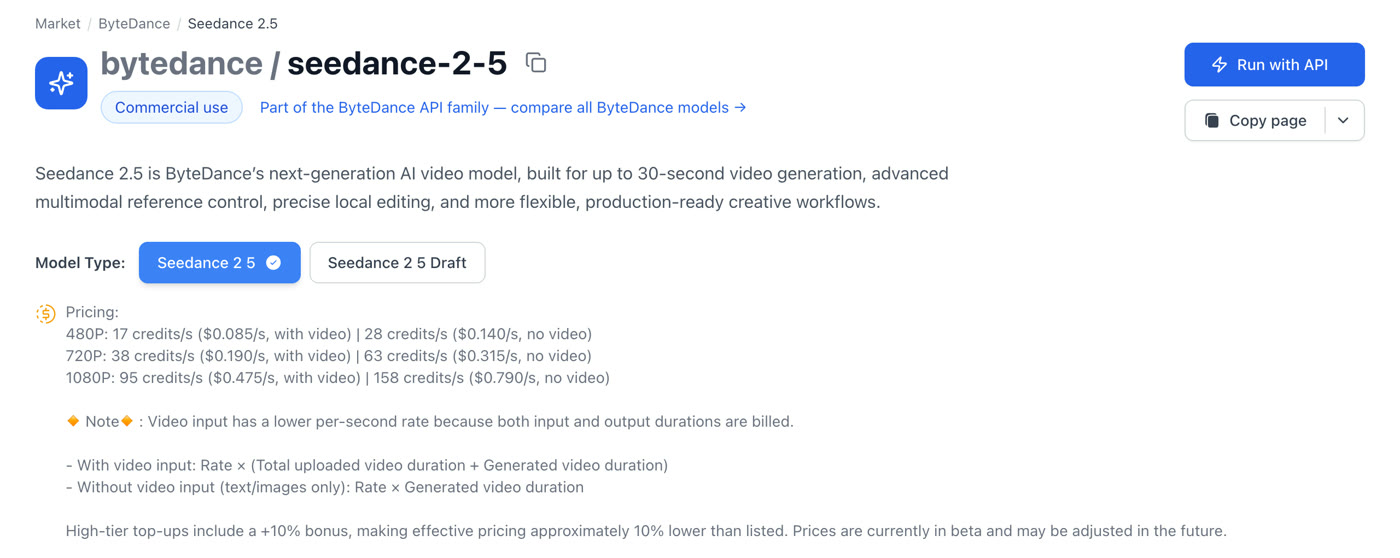
| Resolución | Con video de referencia · y lo que cuesta un video como el mío (17 s subidos + 17 s generados) |
|---|---|
| 480p | 17 créditos/s (US$0.085) · 578 créditos, unos US$2.89 |
| 720p | 38 créditos/s (US$0.190) · 1,292 créditos, unos US$6.46 |
| 1080p | 95 créditos/s (US$0.475) · 3,230 créditos, unos US$16.15. Es lo que me cobraron. |
Con video de referencia te cobran los segundos que subes más los que genera: (17 + 17) × 95 = 3,230 créditos. Sin video la tarifa por segundo es más alta, pero sólo cuenta lo generado. Según la página de precios de Kie, un crédito cuesta unos US$0.005.
Se cobra al terminar y no encontré cómo cancelar una tarea ya lanzada. Revisa fotos, orden y prompt antes de correrlo. Si la tarea falla, no te la cobran. Tampoco hay semilla: cada tirada sale distinta, así que guarda la buena. Mi tirada de 1080p tardó unos 8 minutos en salir.
¿Usas la API de Kie? Así va la llamada
{
  "model": "bytedance/seedance-2-5",
  "input": {
    "prompt": "[EL PROMPT DE ARRIBA, YA LLENO]",
    "reference_image_urls": ["[URL DE LA FOTO 1]", "[… HASTA LA 8, EN ORDEN]"],
    "reference_video_urls": ["[URL DE TU VIDEO DE 720p]"],
    "resolution": "720p",
    "aspect_ratio": "9:16",
    "duration": 17,
    "generate_audio": true
  }
}
Te regresa un taskId; con él consultas el estado hasta que el video esté listo. Las URLs tienen que ser públicas. Los nombres de los campos son los de la documentación de Kie del 1 de noviembre de 2026.
El paso a paso
De tu sala al escenario
Así lo hice, en orden, con lo que salió en cada paso.
Graba tu actuación. 17 s, vertical, un gesto por frase
Yo me grabé en mi sala, con el celular fijo y la misma ropa negra que tenía puesta.
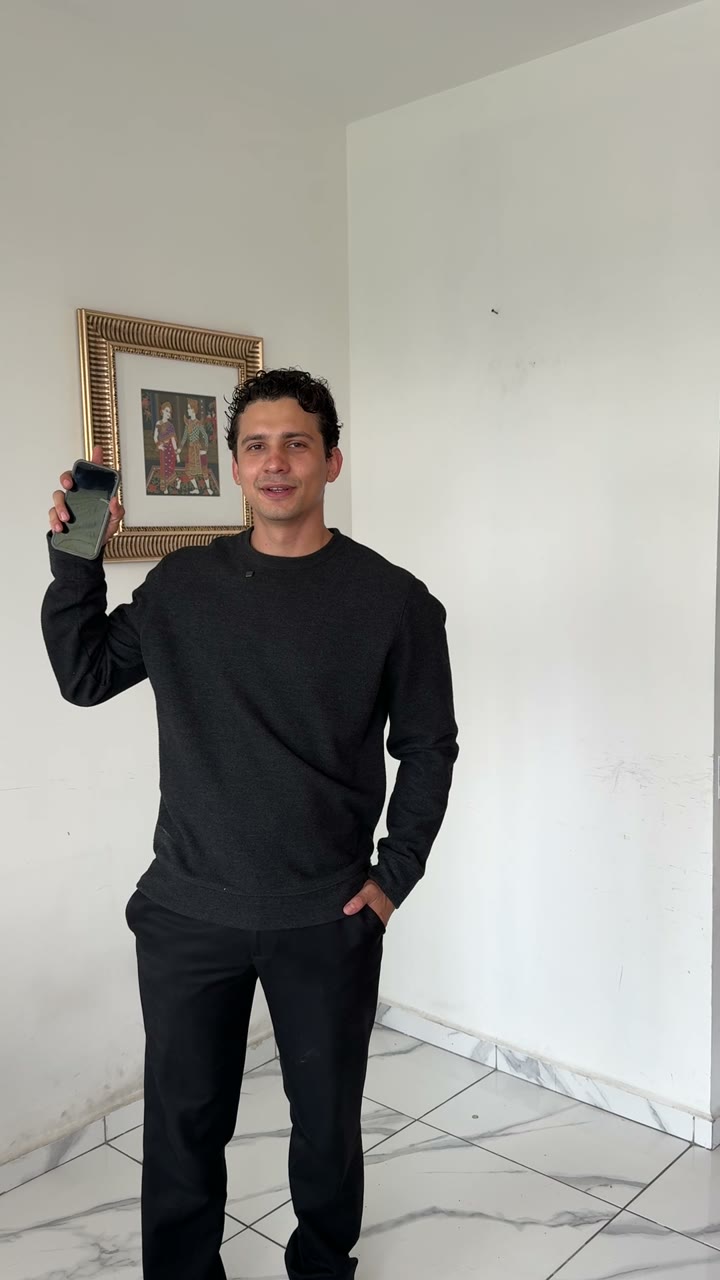
Mi toma · segundo 12, cuando saco el teléfono Haz tus referencias. En el orden de arriba
Lentes, escenario, retrato, cuerpo completo, contraplano y teléfono. Tus dos fotos de cara ya las tienes. Los prompts están en Haz las tuyas.
Baja tu video a 720p. 720×1280, 30 fps
Con el comando de Graba tu actuación o con cualquier editor. En 1080p, Kie no lo acepta como referencia.
Sube todo en orden y ajusta. 9:16, 17 s, audio encendido
En el playground de Seedance 2.5 en Kie: las 8 fotos en reference_image_urls, tu video en reference_video_urls, el prompt lleno, y estos ajustes. De fábrica viene en 5 s y «adaptive»: cámbialos.
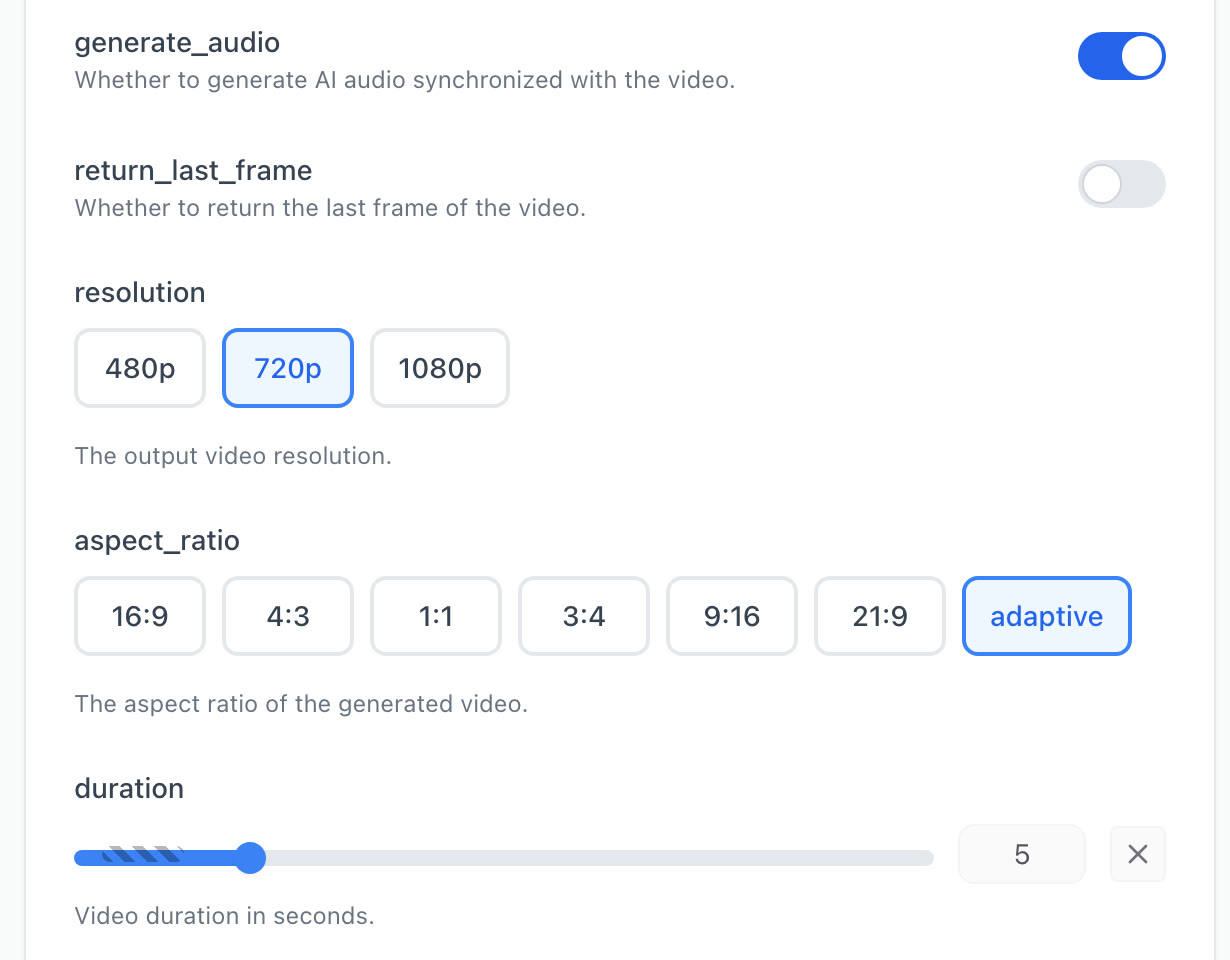
El playground de Seedance 2.5 en Kie, con sus valores de fábrica · captura real · 1 nov 2026 Lánzalo y espera. Primero a 720p si es tu primera vez
Yo me fui directo a 1080p porque ya había probado Seedance 2.5 con mi cara unos días antes. Si es tu primera vez, prueba a 720p y revisa la cara en las seis tomas, los lentes, el teléfono y que no haya letras en pantalla.
Revisa las seis cámaras. Esto me salió en la tirada de 1080p
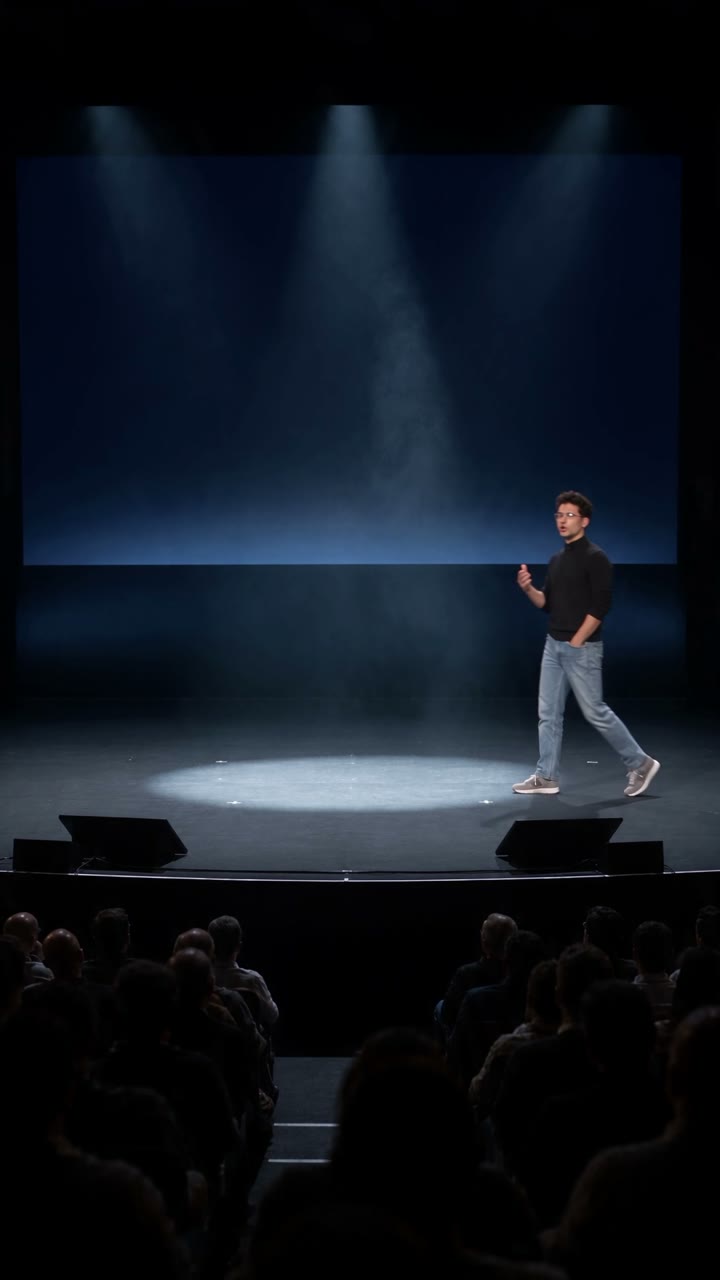
Cám. 1 · abierta0–2.5 s Cám. 2 · contrapicado2.5–6.0 s 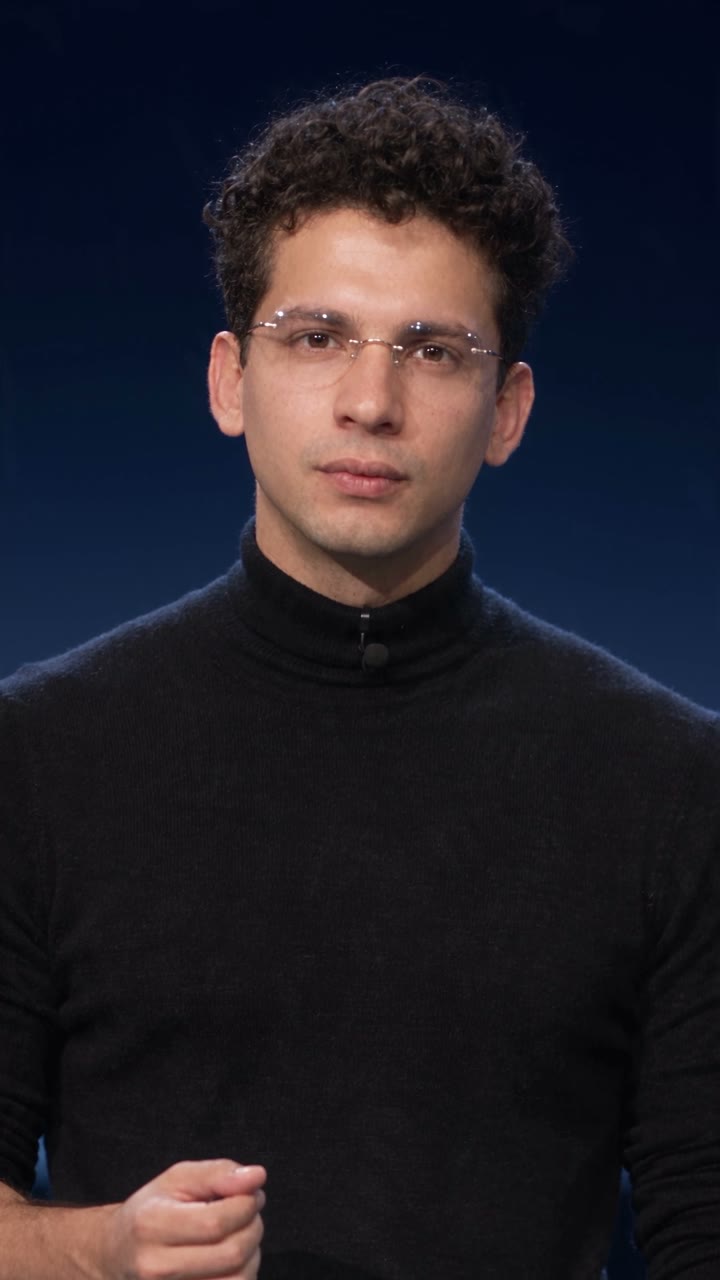
Cám. 3 · cerrada6.0–9.2 s 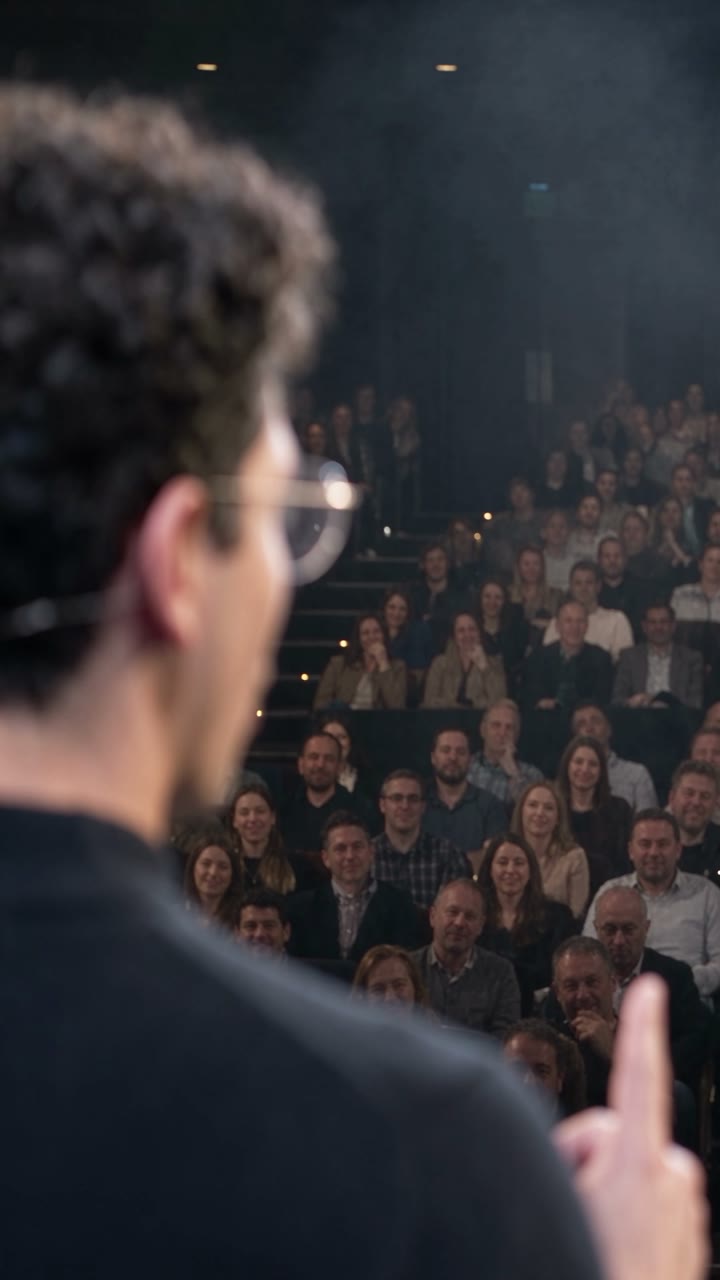
Cám. 4 · contraplano9.2–11.0 s 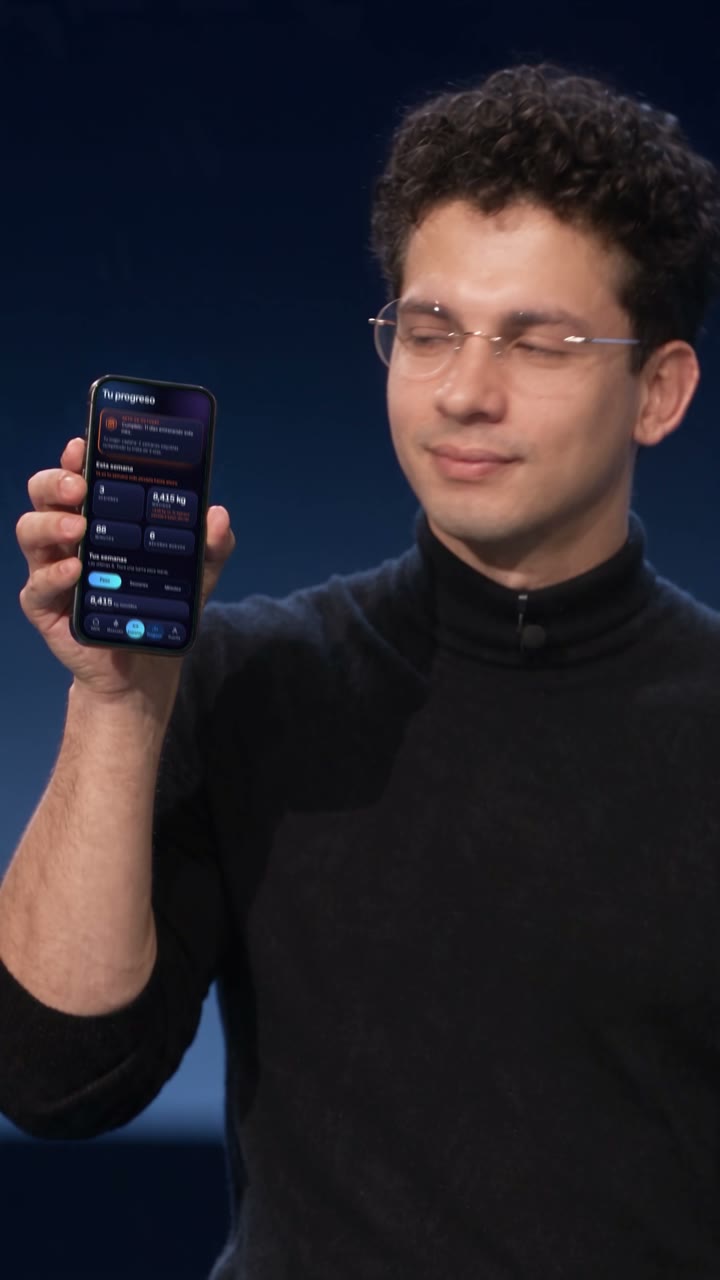
Cám. 5 · el teléfono11.0–13.8 s 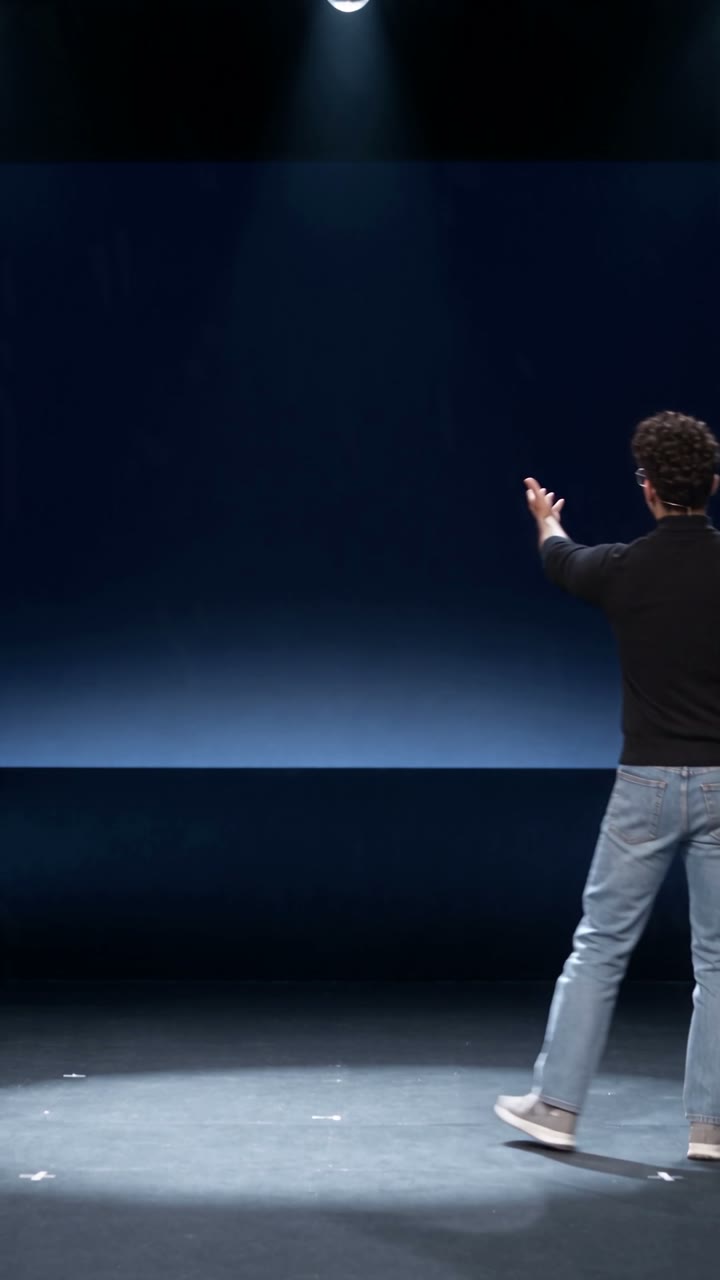
Cám. 6 · la revelación13.8–16.5 s Pedí los cortes en 2.3, 5.8, 8.6, 10.6 y 13.8 s y salieron en 2.5, 6.0, 9.2, 11.0 y 13.8. En la cámara 5 ya se ve la app: es la pantalla verde cambiada en la post.
La post · opcional
La pantalla verde es para poner tu app después
Seedance no sabe cómo se ve tu app, y si se lo pides, inventa letras. Por eso el teléfono sale en verde plano: después se sigue y se cambia por la pantalla real.
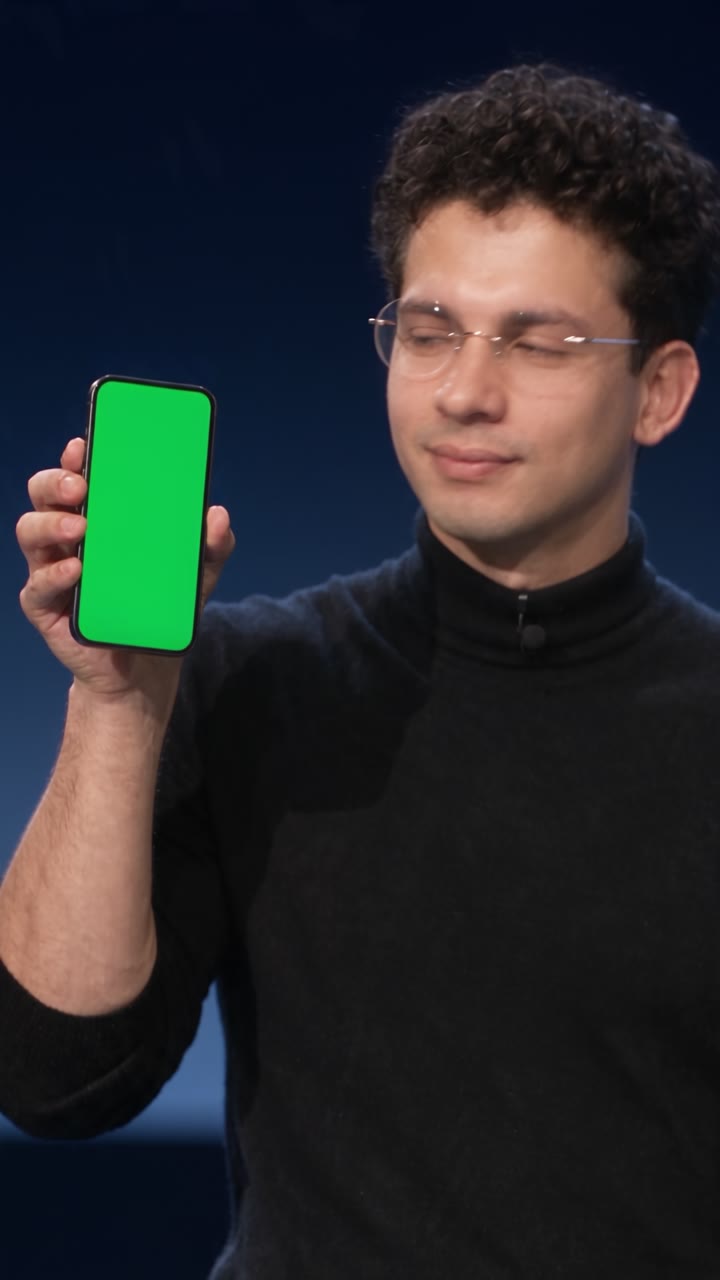
Sigue las cuatro esquinas. Contra el bisel negro
Con cualquier editor que siga cuatro esquinas (corner pin o seguimiento planar), como After Effects o DaVinci Resolve. Por eso el prompt pide las cuatro esquinas siempre a la vista.
Recorta los dedos con el verde. Para que queden encima
El verde plano sirve de llave: los dedos que pasan por la orilla se quedan delante de tu pantalla.
Pega tu pantalla real. Con la luz del plano
Bájale un poco el brillo y dale el mismo desenfoque del cuadro. Una pantalla perfecta y nítida se ve pegada.
Lo dejé tal cual lo generó Seedance: mi voz con eco de teatro, el murmullo, la risa y el aplauso. No le corté nada al video. Lo único que le agregué fue música de suspenso.
Si algo falla
Síntoma, causa y arreglo
Son los atorones que me tocaron con este video y los que el prompt ya trae resueltos.
| Lo que pasa | Qué hacer |
|---|---|
| La cara se va hacia otra persona: calvo, con barba, con canas, mayor | Es el vestuario jalando hacia la cara famosa. Deja tus dos fotos de cara como @Image1 y @Image2 y el bloque «Never bald, never a full beard, never grey hair, never older, never a different person». |
| Te bloquea o te cambia la cara por la de un famoso | Quita del prompt cualquier nombre de persona real. El look sale de la ropa, los lentes y el escenario. |
| Salen cintillos, nombres, logos o reloj de televisión | Déjalos en PROHIBITED («lower thirds, name titles, channel logos, tickers or timecode») y pide «an unedited live broadcast» en LOOK. |
| Letras o imágenes en la pantalla gigante | «the giant screen is navy, never green, never with text or images», en CONTINUITY y en PROHIBITED. |
| Los cortes caen tarde | A mí me salieron entre 0.2 y 0.6 s después de lo pedido. Pídelos un poco antes, o recorta en la edición. |
| Quieres tu voz original y no cuadra | Seedance alarga algunas frases: a mí, dos frases y una pausa, entre 0.5 y 0.8 s. Pega tu voz frase por frase, o quédate con el audio que genera, que ya viene sincronizado. |
| Sale un micrófono de diadema | Viene de tus fotos: mi contraplano lo traía y en esa toma se coló un hilito. Revisa que ninguna referencia lo tenga; el prompt ya lo prohíbe y pide el micrófono de solapa de @Image3. |
| Los lentes cambian de forma o salen ovalados | Usa unos lentes perfectamente redondos en @Image8 y un retrato (@Image3) donde se vean redondos. Una de mis versiones los sacó ovalados y la descarté. |
| Kie rechaza tu video de referencia | Tiene que ser 480p o 720p (entre 409,600 y 927,408 píxeles), de 24 a 60 fps, de 2 a 30 s, y tus videos no pueden sumar más de 30 s. |
| Quieres repetir una tirada igualita | No se puede: no hay semilla. Cada tirada sale distinta; guarda la buena. |
| Lanzaste con un error | No encontré cómo cancelarla y se cobra al terminar. Si la tarea falla, no se cobra. Revisa todo antes de lanzar. |
| Verde en la cara o en los dedos | «green light on the face» va en PROHIBITED; en @Image7 la pantalla sólo deja un brillo leve en las yemas. |
| Tu plataforma corta en 15 s | Recorta tu guion a 15 s y mueve los segundos de la TIMELINE. En Kie, Seedance 2.5 llega a 30 s. |
| Te bloquean las fotos de tu cara | En Dreamina las fotos de caras reales se bloquean. En Kie corrió con la mía. |
La letra chica
Qué está probado y qué no
Probado una vez, con mi cara
Una tirada a 1080p el 30 de octubre de 2026, y es la del reel. No hay semilla: con el mismo prompt tu tirada va a salir distinta. Los cortes y las seis tomas de esta guía son los que salieron de verdad.
Sólo tu cara, o la de alguien que te dio permiso
Y no lo uses para hacer pasar por real un evento que no pasó. Este keynote nunca existió, y por eso se cuenta así.
Los precios tienen fecha
Los leí en kie.ai el 1 de noviembre de 2026. La misma página dice que están en beta y pueden cambiar: revísalos antes de recargar créditos.
Fuentes y método
De dónde sale cada dato
- Kie: documentación de Seedance 2.5: el endpoint, el modelo bytedance/seedance-2-5, los campos y los límites del video de referencia (480p o 720p, [409600, 927408] píxeles, 24 a 60 fps, 2 a 30 s, suma de 30 s). · 1 nov 2026docs.kie.ai
- Kie: página de Seedance 2.5: tarifas por resolución con y sin video y «Rate × (Total uploaded video duration + Generated video duration)». · 1 nov 2026kie.ai/seedance-2-5
- Kie: precios: «1 credit ≈ $0.005». · 1 nov 2026kie.ai/pricing
- Mi tirada: el recibo de la tarea en Kie, con 3,230 créditos cobrados por el video de 1080p y 17 s. · 30 oct 2026
Cómo se hizo esta guía. El prompt, las 8 fotos y los seis prompts de imagen son los que usé para el video del reel, sin cambios; la plantilla es ese mismo prompt con corchetes. Los cuadros son del video que generó Seedance el 30 de octubre de 2026 y de mi toma original, sin retoque; en la cámara 5 la pantalla del teléfono ya está cambiada. Las capturas de Kie las tomé el 1 de noviembre de 2026. Los dólares salen de la tabla de Kie, que los da por segundo. Sotai no está afiliada a Kie, ByteDance, Google ni OpenAI.
Grábate hoy: 17 segundos bastan
Empieza por tu actuación y tus fotos de cara. Lo demás está en esta página, listo para copiar.

Alex Sepúlveda · 1 de noviembre de 2026
Sigue aprendiendo
Más guías de video e imagen
 Fotos con IA · 21 oct 2026Pro Photo: la skill gratis para que tus fotos con IA parezcan de fotógrafo, con el paso a paso
 Video en vivo · 12 sep 2026Una transmisión que nunca termina y que el público dirige
 GPT Image · 22 ago 2026100 comandos para transformar cualquier foto con IA
¿Lo quieres funcionando en tu negocio sin armarlo tú?
Escríbenos